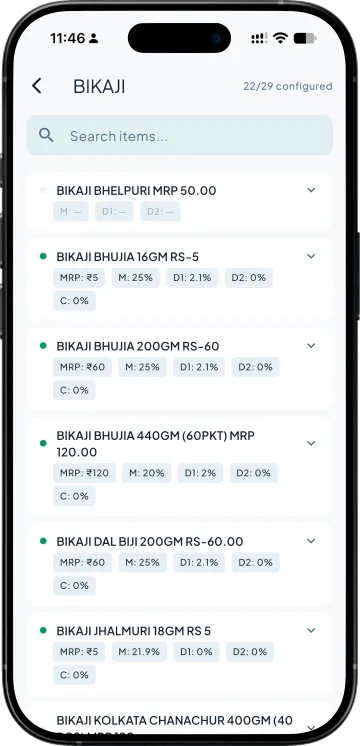
Set five numbers per item, once
Printed MRP, retail margin, D1, D2 and the salesman's commission on that item. Set them by stock group in one screen, or on the item itself. The margin is the one the owner controls; the rest can be delegated.

Set MRP, the retailer's margin and two trade discounts once per item. Every bill prices itself from there, and the app says how much room is left before a line loses money.
MRP-based billing for Tally is what Takkada's FMCG module does: each stock item carries its printed MRP, the retailer's margin, two sequential trade discounts and an item-wise salesman commission. When a salesman bills, the rate comes down from MRP through the margin and both discounts. Any extra discount he types is checked against that line's break-even before saving.
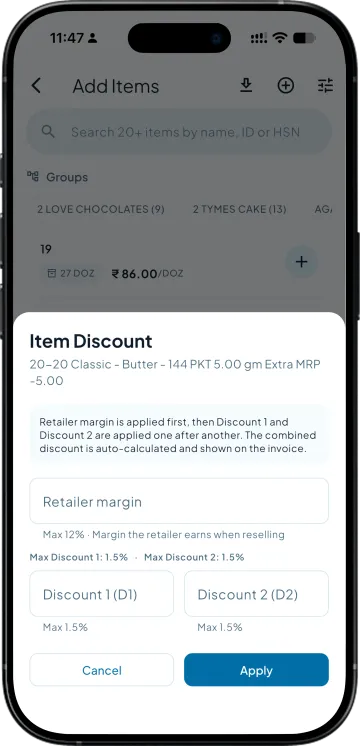
Printed MRP, retail margin, D1, D2 and the salesman's commission on that item. Set them by stock group in one screen, or on the item itself. The margin is the one the owner controls; the rest can be delegated.
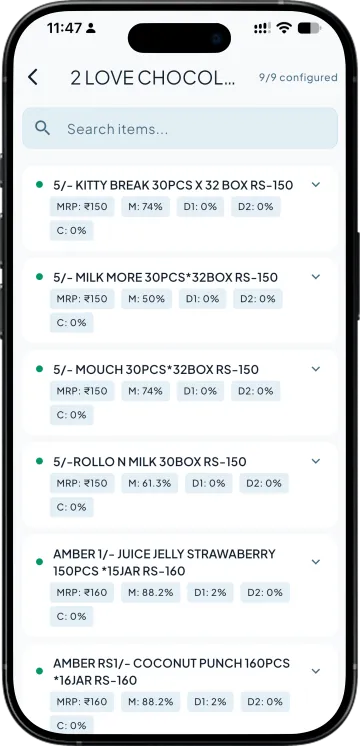
MRP divided by the margin gives the retailer's base rate. D1 and D2 come off after that, one after the other. The salesman adds the item and sees the billed rate without touching a calculator.
If the salesman offers something on top, the Item Discount sheet shows the maximum for that item and how much headroom is left. A line pushed past break-even is flagged before the bill is saved.
| What you need | Takkada | Tally on the office desktop |
|---|---|---|
| Rate from MRP and margin | Computed per line from the item's MRP, margin, D1 and D2. | A price list typed into a price level, redone when MRP changes. |
| A floor on the salesman's discount | Max % shown on the sheet; a line past break-even is flagged before save. | Found in the evening, when the bill is already with the retailer. |
| Who may change the margin | Owner or admin only. Others see the field and its limit, disabled. | Whoever has the Tally machine open. |
| Salesman commission on the line | Item-wise %, on the ex-GST value after discount, into Team Sales. | A month-end spreadsheet. |
Comparison describes a desktop-only Tally setup without a mobile companion. Your own workflow may differ.
The FMCG module is an add-on to any plan with invoice creation from the phone, which starts here. The add-on is priced on the demo call.
Momentum ₹3,375/year + GST on a 3-year term
See what every plan includesBecause a retailer's margin is stated on his cost, not on MRP. A 20% margin means he sells at 100 what he bought at 83.33. Subtracting 20% would give him 80 and hand him 25%. The app uses the divisor so the number on the bill is the number you agreed.
Two trade discount stages applied one after the other, after the margin. Most FMCG structures have a scheme discount and a distributor discount; D1 and D2 hold those. Either can be left blank, and a blank stage is simply skipped when the rate is worked out.
The Item Discount sheet shows the maximum for the item as a hint and the headroom that remains after what he has typed. If his figure crosses break-even the line is marked, so the owner can see it on review before it posts to Tally.
The MRP is kept in Takkada against the stock item and is GST-inclusive, as printed on the pack. The voucher that reaches Tally carries the list rate and the discount percentage; Tally's own item master is not changed by the module.
Book a demo. We walk through your setup, your Tally version, and exactly what changes for your business.