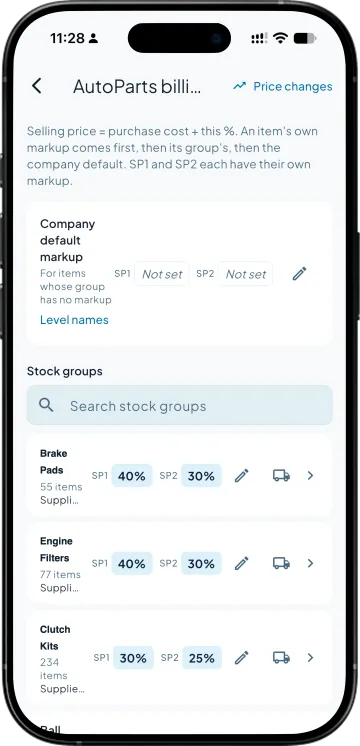
Set the markup where it belongs
One company default. A different figure on a stock group where the brand demands it. An override on the odd item. The most specific one wins, and an item can be excluded so the ordinary rate applies.

Parts have no MRP worth trusting and a cost that moves with every consignment. Price them from what they actually cost you, and let the bill update when the cost does.
Cost-plus pricing for Tally in Takkada's AutoParts billing reads each part's latest purchase cost from Tally, ex-GST and per base unit, and applies a markup set at the company, the stock group or the item, whichever is most specific. Two markups give two selling prices, one per price level, and the party's level decides which one the bill takes.
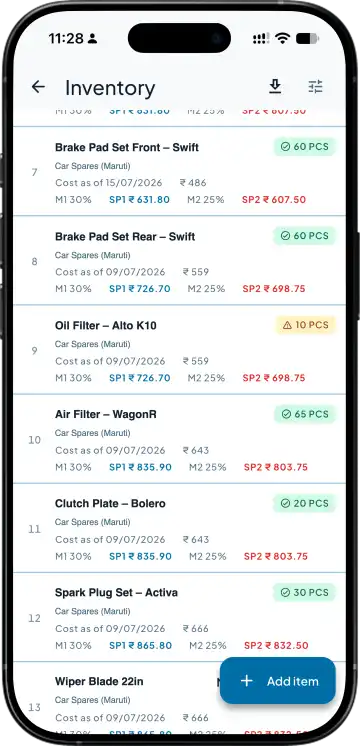
One company default. A different figure on a stock group where the brand demands it. An override on the odd item. The most specific one wins, and an item can be excluded so the ordinary rate applies.
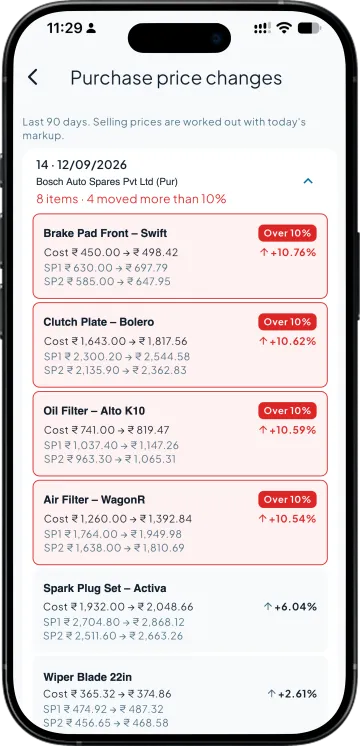
The latest purchase voucher in Tally gives the per-unit cost, ex-GST. When a new consignment books at a new cost, the selling price recalculates and the Price Changes screen lists every part that moved and by how much.
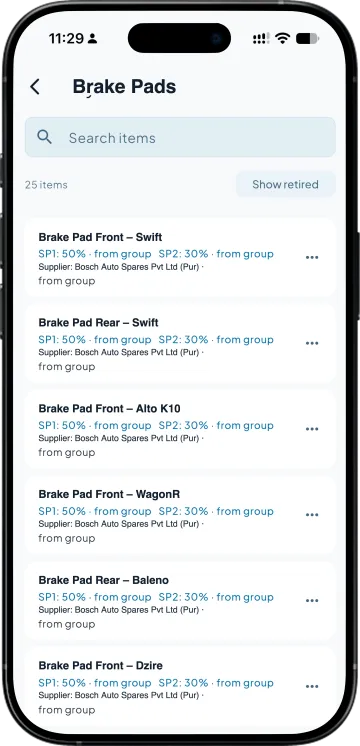
A second markup gives a second selling price. Name the levels what you call them, assign each party to one, and the bill picks the right price without the salesman choosing. Cost and markup stay hidden from anyone without full access.
| What you need | Takkada | Tally on the office desktop |
|---|---|---|
| Selling price when cost changes | Recalculated from the new purchase; the change is listed part by part. | A price list edited by hand, usually a few consignments late. |
| Different margins for different brands | Markup per stock group, with item overrides where needed. | In the owner's head, or a separate price level per brand. |
| Keeping cost away from the counter | Cost and markup withheld for anyone who is not full access. | Anyone at the Tally machine can open the purchase register. |
| Why a bill was priced the way it was | Cost, markup and purchase date kept on the line, for the life of the invoice. | Reconstructed from memory when the customer asks. |
Comparison describes a desktop-only Tally setup without a mobile companion. Your own workflow may differ.
AutoParts billing is an add-on to any plan with invoice creation from the phone, which starts here. The add-on is priced on the demo call.
Momentum ₹3,375/year + GST on a 3-year term
See what every plan includesThe most recent purchase voucher for that part in Tally, per base unit, ex-GST. If you buy the same part from several suppliers, a preferred supplier can be set so the cost follows that supplier's bills rather than whichever arrived last.
Yes. An item can be excluded from AutoParts pricing, in which case it takes the ordinary rate from its Tally price level, whatever its stock group or the company default says. The exclusion is per item and can be lifted later.
No. Each line stores the cost, markup and purchase date it was priced from. Reopening a saved invoice, sales order or challan shows the price it was billed at, not today's, so a customer's copy and yours always agree.
The selling price for the party's level, the unit and the GST basis. Cost and markup are withheld unless the member has full access; the app does not derive one from the other on the phone, so a screenshot of the cart gives nothing away.
Book a demo. We walk through your setup, your Tally version, and exactly what changes for your business.